Part 2 — From Code to Conversation: Designing the Gradio Interface for a Tangible AI Experience
Where a local AI learns to speak — and soon, to move.
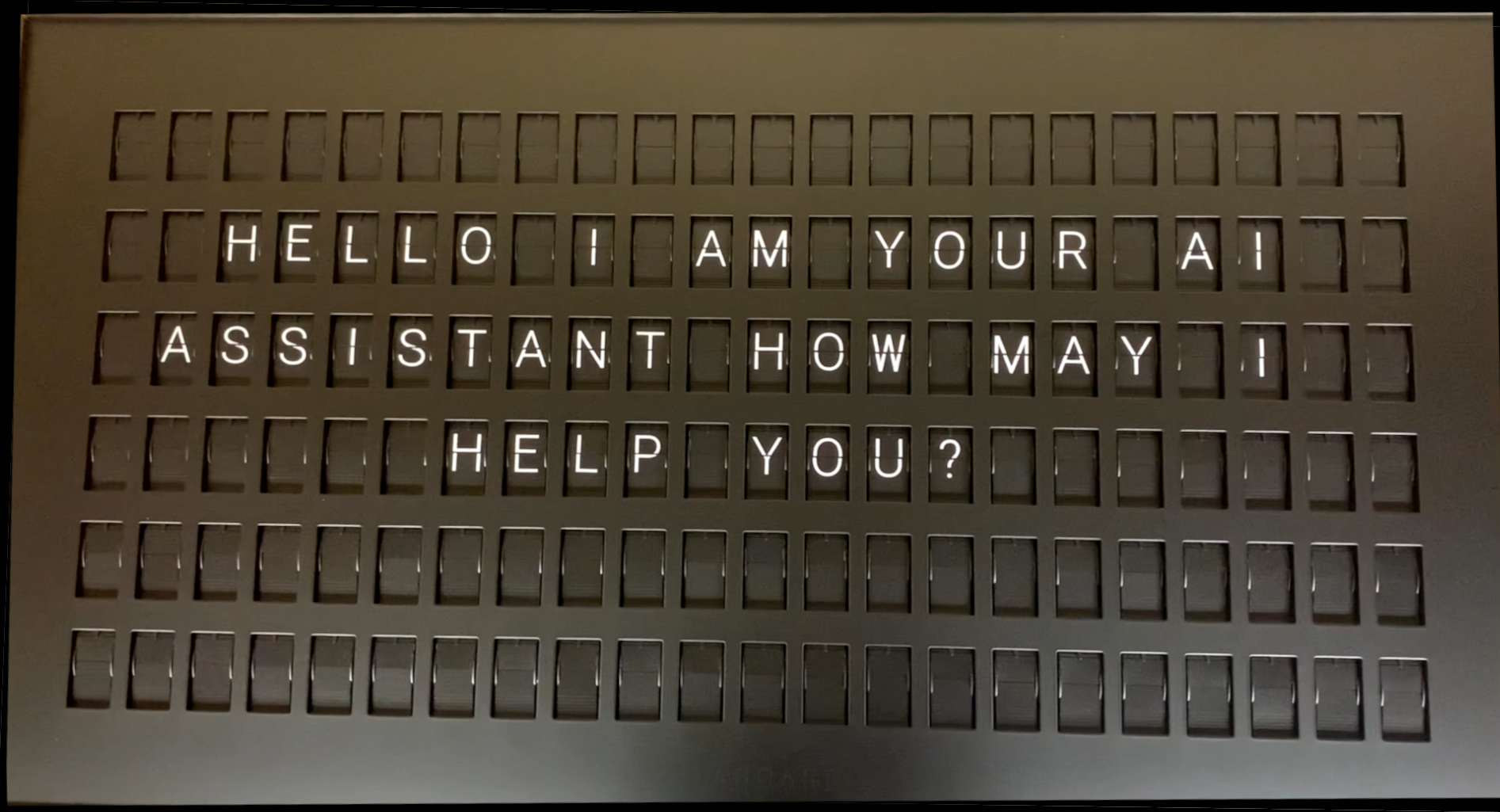
Introduction — Turning Concept into Conversation
In Part 1 → The Spark of Color: Giving AI a Voice Beyond the Screen, we explored the idea of giving a digital AI a mechanical voice through the Vestaboard.
Now, in Part 2, the vision begins to move.
This stage builds the conversation layer — the bridge between human and machine that allows thought to flow both ways, eventually manifesting as sound and color. Here, LangChain, Gradio, and local inference converge to make AI expression both private and tangible.
The complete source code for this project is publicly available on GitHub at GitHub - Garry-TI/vestaboard-vc. There you can explore all referenced files — including app.py, llm_client.py, and vestaboard_client.py — to follow along or replicate the project in your own environment.
You will also need to request an API key from Vestaboard by sending an email to support@vestaboard.com
1 · Establishing the Local Mind
The project's foundation begins in config.py, where every supported LLM is described with its Hugging Face path, token limits, and temperature:
# Local Vestaboard Configuration
# Use the API key you received after enabling the Local API (not the enablement token)
VESTABOARD_CONFIG = {
    'ip': '#.#.#.#', # Replace with the IP address assisgned to your Vestaboard
    'api_key': 'Your API Key Here'  # Replace with your actual API key
}

# LLM Model Configuration
# Configure local LLM models for AI chat feature

LLM_MODELS = {
    'Llama-3.2-1B-Instruct': {
        'model_id': 'meta-llama/Llama-3.2-1B-Instruct',
        'max_tokens': 132, # Vestaboard Character limit (6 rows x 22 chars)
        'temperature': 0.7,
        'description': 'Llama 3.2 1B Instruct – Fast and efficient'
    },
    # Ad more LLM models here as needed
}

# Default Model for AI chat
DEFAULT_LLM_MODEL = 'Llama-3.2-1B-Instruct'
The LLMClient in llm_client.py manages model initialization and text generation using LangChain's HuggingFacePipeline:
from typing import Dict, Optional
from langchain_community.llms import HuggingFacePipeline
from transformers import AutoTokenizer, AutoModelForCausalLM, pipeline
import torch
from config import LLM_MODELS, DEFAULT_LLM_MODEL

class LLMClient:
    """Client for managing local LLM inference."""

    def __init__(self, model_name: Optional[str] = None):
    def initialize(self) -> Dict[str, str]:
    def generate_response(self, prompt: str, max_length: int = 132) -> Dict[str, str]:
    def _format_prompt(self, user_prompt: str) -> str:
    def _clean_response(self, response: str, original_prompt: str) -> str:
    def _truncate_response(self, response: str, max_length: int) -> str:
    def get_model_info(self) -> Dict[str, any]:
    def change_model(self, model_name: str) -> Dict[str, str]:
All inference happens locally — no cloud calls, no external APIs. Your data, your hardware, your conversation.
2 · Giving the AI a Voice — LangChain Response Flow
To ensure responses fit the Vestaboard's 6×22 grid (132 characters), the prompt is formatted and bounded:
system_msg = "You are a helpful assistant. Provide concise answers in 132 characters or less."
formatted = (
    f"<|im_start|>system\n{system_msg}<|im_end|>\n"
    f"<|im_start|>user\n{user_prompt}<|im_end|>\n"
    f"<|im_start|>assistant\n"
)
Each output is cleaned and truncated to stay within physical display limits — turning token streams into concise, intentional statements ready for mechanical delivery.
3 · Building the Interface — Gradio as the Human Touch
In app.py, the VestaboardApp class defines a full Gradio UI that acts as the conversational front-end:
import gradio as gr
from llm_client import LLMClient
from vestaboard_client import VestaboardClient
from config import LLM_MODELS

    def __init__(self):
        """Initialize the Vestaboard application."""
        try:
            self.client = VestaboardClient()
            self.connection_status = "Initializing..."
        except Exception as e:
            self.client = None
            self.connection_status = f"Error initializing: {str(e)}"

        # Initialize LLM client (lazy loading - will initialize on first use)
        self.llm_client = None
        self.current_llm_model = None
The interface includes:
- Test Connection – verify the board's reachability
- AI Chat to Vestaboard – ask questions, receive AI answers, and send them straight to the board
- Color Test & Price Feed – diagnostic and live-data modes for gold/silver pricing
A single Gradio callback powers the magic:
    def chat_with_ai(self, user_question: str, model_name: str) -> Tuple[str, str]:
        """
        Send question to AI and display response on Vestaboard.

        Args:
            user_question: User's question for the AI
            model_name: Selected model name

        Returns:
            Tuple of (AI response, Vestaboard status)
        """
        if not user_question or user_question.strip() == "":
            return "Please enter a question", "No message to send"

        # Initialize model if needed
        if not self.llm_client or self.current_llm_model != model_name:
            init_status = self.initialize_llm(model_name)
            if "Error" in init_status or "✗" in init_status:
                return f"Model initialization failed: {init_status}", "Model not ready"

        # Generate AI response
        try:
            result = self.llm_client.generate_response(user_question, max_length=132)

            if result['status'] != 'success':
                return f"Error: {result['message']}", "AI generation failed"

            ai_response = result['response']

            # Send to Vestaboard
            if self.client:
                vb_result = self.client.send_message(ai_response)
                vb_status = vb_result['message']
            else:
                vb_status = "Vestaboard client not initialized"

            return ai_response, vb_status

        except Exception as e:
            return f"Error: {str(e)}", "Failed to process request"
When you press "Ask AI & Send to Vestaboard,"you trigger a real-time pipeline:
Gradio UI → LangChain LLMClient → VestaboardClient → Analog Display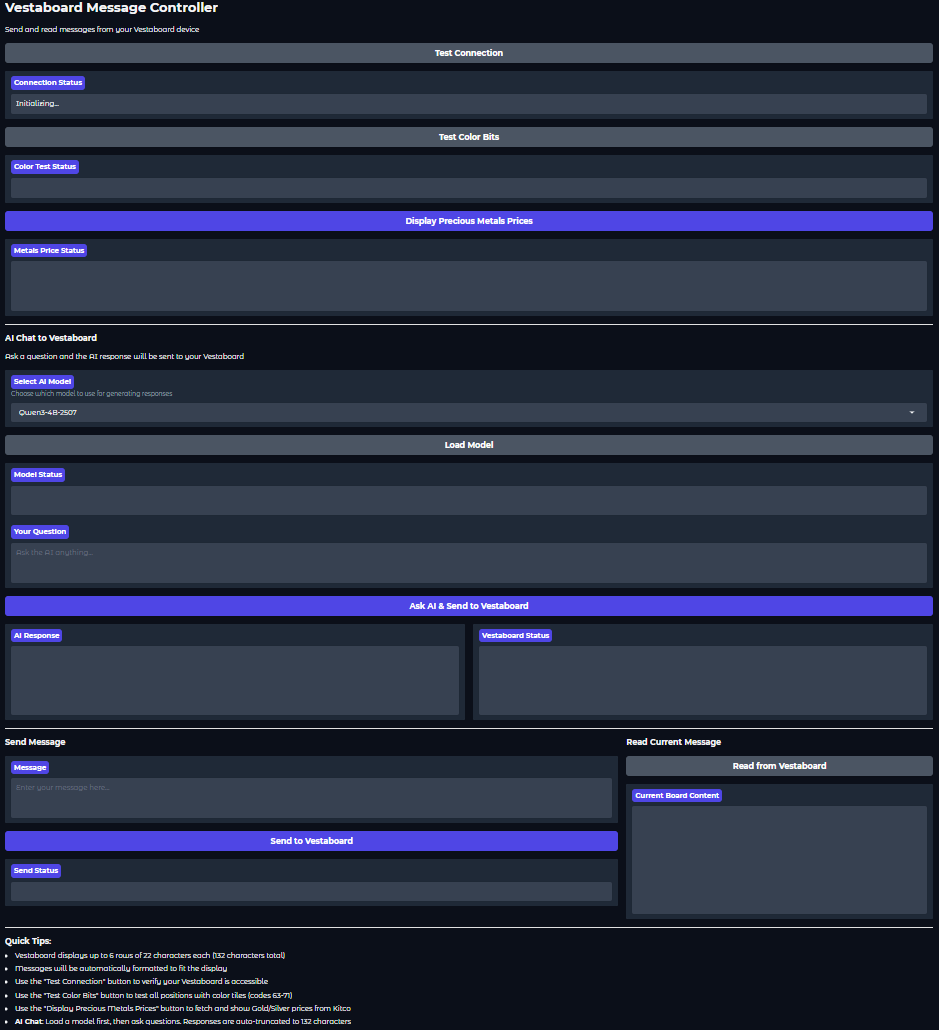
4 · Orchestrating Dialogue and Display
Every control in the UI serves a purpose:
- Load Model — swap models (Llama or Qwen) instantly
- Test Connection — Vestaboard must be on the same local network as client
- Test Color Bits — Displays a color pattern on the Vestaboard for a quick test
- Display Precious Metals Prices — Will display the current gold and silver prices
- Your Question — type your question here
- Ask AI & Send to Vestaboard — send your question to the AI and display response
- AI Response Pane — see the generated reply
- Vestaboard Status — confirm physical delivery
Underneath, VestaboardClient in vestaboard_client.py handles sanitization (uppercase only, valid character map) and posts messages to the board's local API.
The result: a closed-loop system where the AI's thought becomes a physical movement you can see and hear.
5 · The Experience in Motion
LangChain memory + Gradio interaction + Vestaboard mechanics = an AI that doesn't just respond — it performs.
Each flip of a tile is a syllable of machine expression, each line of text a verse in a mechanical poem.
Conclusion — A Conversation You Can Hear
By the end of this stage, the AI has found its voice: a local, secure, and tactile one.
It can think with LangChain, speak through Gradio, and be heard via Vestaboard.
Next: Part 3 → Words Made Visible: Displaying AI Thoughts on a Vestaboard where these responses transform into synchronized color and motion — the final stage of digital thought becoming analog art.
When the AI's response flutters across the board, it's not just an answer — it's proof that thought itself can make a sound.
Read the Series
- Part 1 → The Spark of Color
- Part 2 → From Code to Conversation (you are here)
- Part 3 → Words Made Visible
© 2025 Tomorrow's Innovations LLC · Written by Garry Osborne · GitHub Repository
This is Part 2 of the series