Introduction
Imagine asking your watch a question and getting an immediate answer without needing internet connectivity – that's the power of running a small language model (slm) on the device itself. In this three-part series, we will explore building a simple chatbot that runs entirely on an Apple Watch Ultra 2, using a small open-source language model.
By running the AI model locally on the watch (instead of a cloud server), we achieve on-device intelligence with compelling benefits:
- Privacy: Your data stays on your wrist – no server processing required
- Offline Access: Works anywhere, even without cellular or WiFi
- Reduced Latency: No network round-trip means faster responses
- Independence: No subscription services or API costs
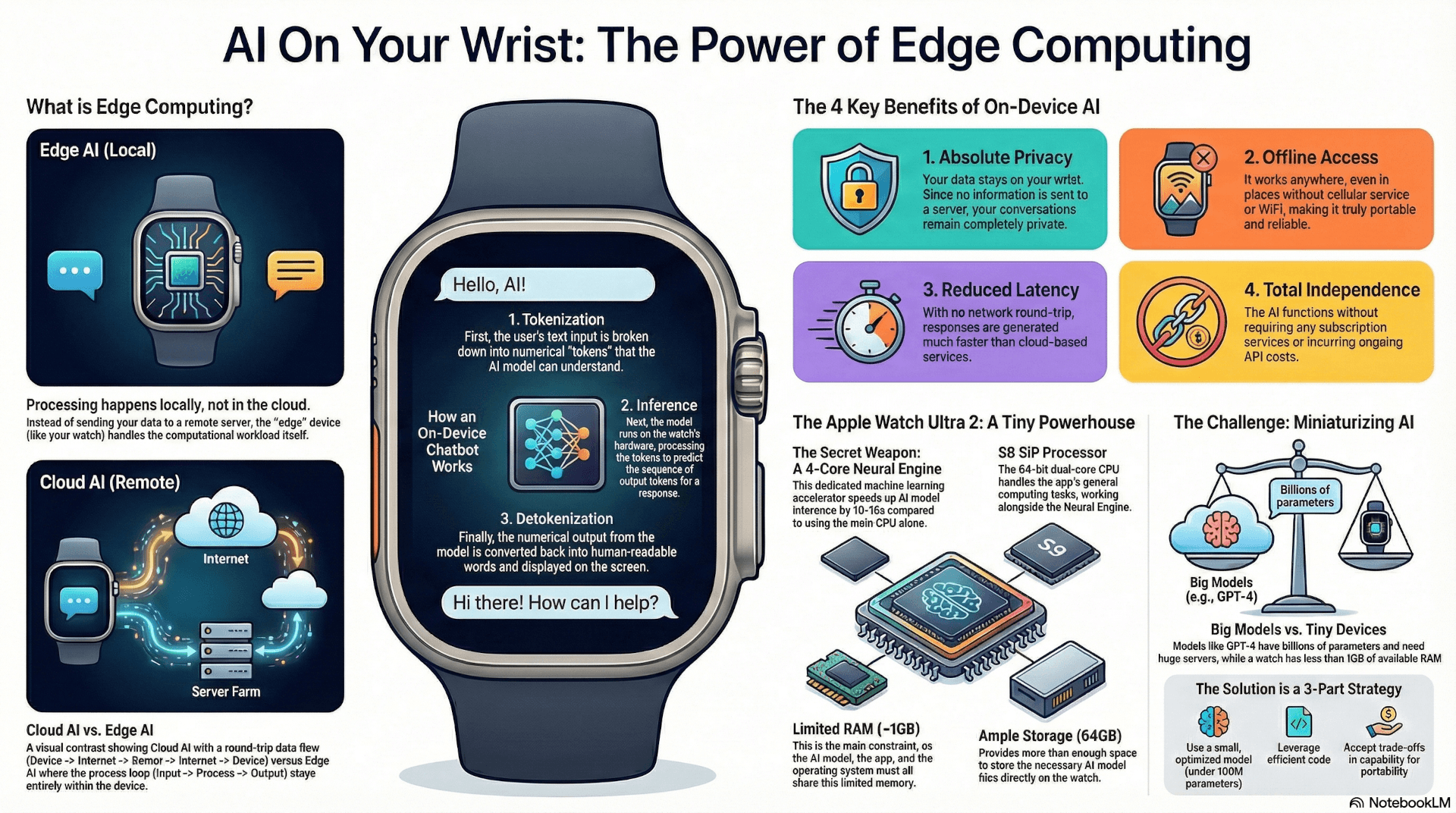
Click to view full-size infographic
What is Edge Computing?
Edge computing is a paradigm where computation happens locally on the "edge" device rather than in the cloud. Instead of sending your data to a remote server for processing, the device itself handles the workload.
For AI applications, this means running machine learning models directly on consumer hardware. Apple has been quietly building toward this future – their latest watches process Siri voice requests on-device when possible, thanks to the S9 chip's Neural Engine.
The Apple Watch Ultra 2: A Tiny Powerhouse
The Apple Watch Ultra 2's hardware makes on-device AI feasible:
| Component | Specification | AI Relevance |
|---|---|---|
| Processor | S9 SiP, 64-bit dual-core CPU | Handles general compute tasks |
| Neural Engine | 4-core dedicated ML accelerator | Speeds up model inference by 10-15x |
| RAM | ~1GB | Must fit model + app + OS |
| Storage | 64GB | Plenty of room for model files |
The Neural Engine is the secret weapon here. Apple designed it specifically for machine learning tasks, and it can perform tensor operations far more efficiently than the CPU alone. When we deploy our chatbot, we'll target this hardware accelerator using CoreML.
The Challenge: Miniaturizing AI
Here's the catch – Large Language Models (LLMs) are typically resource-intensive. Models like GPT-5.1 have hundreds of billions of parameters and require enterprise-grade hardware. Even "small" language models (SLMs) like Llama 2-7B need 14GB of memory in half-precision.
On a tiny wearable with ~1GB of RAM, we need to be clever:
- Use a small, optimized model (under 100M parameters)
- Leverage efficient code and Apple's ML frameworks
- Accept trade-offs in capability for portability
And when it comes to performance, well, think of this project as a proof of concept. I am not going into this with the expectation of reasonable tokens per second response times.
The good news? Enthusiasts have already demonstrated that a distilled GPT-2 model can run locally on Apple Watch Ultra 2 using CoreML. This proves feasibility – with careful optimization, you really can have a miniature chatbot on your wrist. Previous attempts at running a GPT-2 model on an Ultra 2 had challenges with token count. We will be diving deep into every layer of the model to understand exactly how tokens flow through the SLM of choice.
Defining Our Chatbot Function
Before diving into SLM model selection and implementation, let's outline the basic structure of our chatbot. At its core, the chatbot takes user input and generates a text response. Here's the conceptual flow in Swift pseudocode:
func chatbotReply(to userMessage: String) -> String {
    // 1. Tokenize: Convert input string to model-readable token IDs
    let inputTokens: [Int] = tokenize(userMessage)

    // 2. Inference: Run the language model to generate response tokens
    var responseTokens: [Int] = model.generateResponse(to: inputTokens)

    // 3. Detokenize: Convert output tokens back to human-readable text
    let responseText: String = detokenize(responseTokens)

    return responseText
}

// Example usage
let userQuestion = "Hello, how are you?"
let botAnswer = chatbotReply(to: userQuestion)
// Output: "Hello! I'm doing well. How can I help you today?"
This three-step pipeline is universal to all AI SLMs:
- Tokenization: Breaking text into numerical tokens the model understands
- Inference: Running the neural network forward pass
- Detokenization: Converting the output numbers back to words
Input Methods on the Watch
You might wonder how users will input text on such a small screen. Several options exist:
- Voice Dictation: Speak your question, let the watch transcribe it
- Scribble: Draw letters on the screen
- Paired iPhone: Type on your phone, send to watch
- Pre-set Prompts: Quick-reply style buttons for common queries
For our implementation, we'll support all of these through the standard watchOS text input APIs. We will start with pre-set prompts for quick and easy testing.
Series Roadmap
Here's what we'll cover in this three-part series:
Part 1 (This Article): Introduction to edge computing and the project concept
Part 2: Choosing the right small language model – we'll compare candidates like GPT-2 Small, DistilGPT-2, and others, explaining why model selection is critical for success on constrained hardware.
Part 3: Step-by-step implementation – converting the model to CoreML, building the Swift app, and deploying to the Apple Watch Ultra 2.
Development Environment
For this project, we're using:
- Development Machine: Mac Studio M3 Ultra (512GB unified memory)
- IDE: VSCode with Cline extension for AI-assisted coding
- Apple Tools: Xcode 15+ with watchOS 10 SDK
- Version Control: The code will be made available through a GitHub repository
- Target Device: Apple Watch Ultra 2
The Mac Studio's generous memory makes model conversion, fine tuning and testing smooth, even when working with multiple model variants.
What's Next
In Part 2, we'll dive deep into the world of small language models. We'll explore why DistilGPT-2 (82 million parameters) emerges as our top choice, and walk through the model conversion pipeline that transforms a PyTorch model into a watchOS-ready CoreML package.
Stay tuned – we're about to put AI on your wrist!
This is Part 1 of a three-part series on building an on-device AI chatbot for Apple Watch Ultra 2. Follow Tomorrow's Innovations for Parts 2 and 3.
Resources
Published on Tomorrow's Innovations | tomorrowsinnovations.co
This is Part 1 of a three-part series